


 Symantec has issued a warning about what appears to be a successful scam being perpetrated against users of webmail services such as Gmail, Outlook and Yahoo.
The scam is explained in the following short video made by Symantec.
(I say it’s a short video, and it is a short video at only 2 minutes 17 seconds. But clearly Symantec feels you have the attention span of a goldfish, so they’ve added a funky beat in the background to stop you from dozing off).
For those who can’t stand the background music, here is an explanation of how you can steal an email account, just by knowing your victim’s mobile phone number.
In the below example we will imagine that an attacker is attempting to hack into a Gmail account belonging to a victim called Alice.
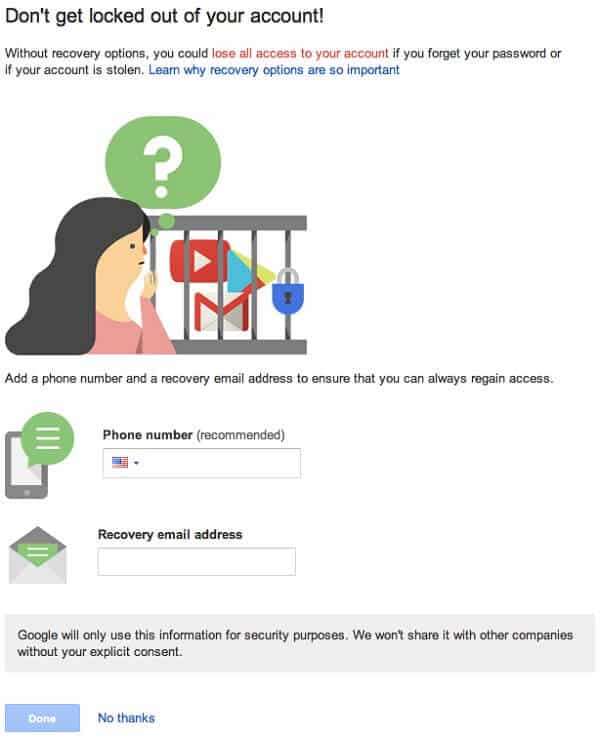
Alice registers her mobile phone number with Gmail so that if she ever forgets her password Google will send her an SMS text message containing a rescue verification code so she can access her account.
A bad guy – let’s call him Malcolm – is keen to break into Alice’s account, but doesn’t know her password. However, he does know Alice’s email address and phone number.
So, he visits the Gmail login page and enters Alice’s email address. But Malcolm cannot correctly enter Alice’s password of course (because he doesn’t know it).
So instead he clicks on the “Need help?” link, normally used by legitimate users who have forgotten their passwords.
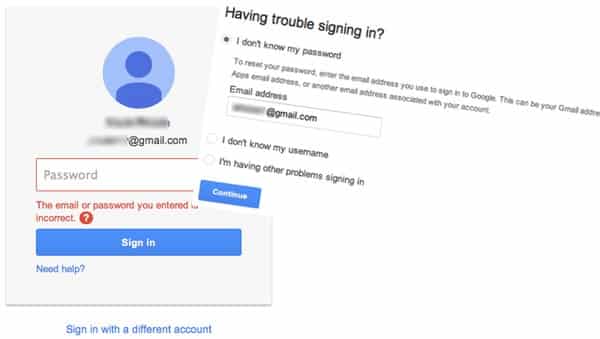
Rather than choosing one of the other options, Malcolm selects “Get a verification code on my phone: [mobile phone number]” to have an SMS message containing a six digit security code sent to Alice’s mobile phone.
This where things get sneaky.
Because at this point, Malcolm sends Alice a text pretending to be Google, and saying something like:
“Google has detected unusual activity on your account. Please respond with the code sent to your mobile device to stop unauthorized activity.”
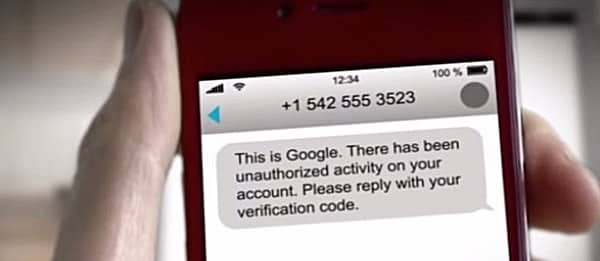
Alice, believing that the message to be legitimate, replies with the verification code she has just been sent by Google.
Malcolm can then use the code to set a temporary password and gain control over Alice’s email account.
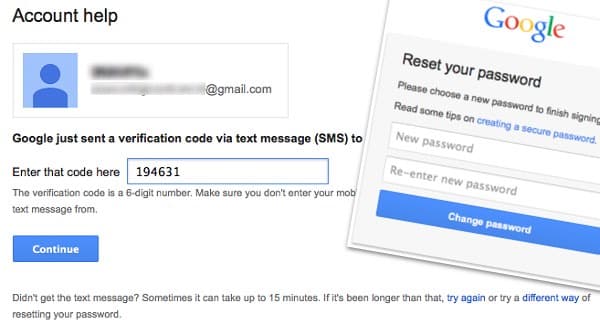
If Malcolm was keen to not raise suspicion, and continue to see every email that Alice receives for the foreseeable future, then it may be that he will reconfigure her email to automatically forward future messages to an account under his control, and then send an SMS to her containing the newly reset password:
“Thank you for verifying your Google account. Your temporary password is [TEMPORARY PASSWORD]”
Even if Alice changes her password at a later date, Malcolm will continue to receive her private email correspondence unless she looks carefully at her account’s settings.
In short – it’s a nasty piece of social engineering which it’s easy to imagine working against many people.
So, what’s the solution?
Well, the simplest advice is to be suspicious of SMS messages that ask you to text back a verification code – in particular if you did not request a verification code in the first place.
However, I wonder how many people when faced with a message that they believe to be from Google or Yahoo would act upon it immediately, with little thinking of the consequences. After all, one of the biggest worries many people might have in this day and age is to be cut off from their email account.
For more details, check out the blog post by Symantec’s Slawomir Grzonkowski.
And for advice on how to better protect your web email account, be sure to listen to this episode of the “Smashing Security” podcast:
Show full transcript ▼
 This transcript was generated automatically, probably contains mistakes, and has not been manually verified.
To give people greater insight into emerging threats. What's really going on out there?
So you can either sign up to be one of their customers, obviously, or you can get their free cyber daily newsletter and get the latest insights in your inbox at no charge whatsoever.
All you have to do is go to recordedfuture.com/intel.
I'm joined today by Carole Theriault. Hello, Carole.
Not everything to do with security is important to everyone, but this one I reckon is important because everyone's got an email address, haven't they?
But I just like it because I don't have to, it's like, I have to be there. You ask me a question, if I'm not there, I can't answer in half an hour, there's no point.
With email, I get that chance to reply later.
So I'm sort of like, sure, I'm going to carry on using email. Works fine for me. Now, most people are using, I would argue, webmail.
They have some sort of web interface for accessing the mail. And of course, there are the big webmail services, the Gmail, the Outlook, Yahoo, you know, these great big giants.
And that's probably where the majority of people have got their email. Right now, there are third parties as well.
So what I thought we'd do today is we'd look at how we can better protect our webmail accounts.
Now, what techniques can listeners use to make sure that their accounts don't get hacked and their information isn't stolen? Because obviously that could be damaging to us.
You know, there's so many different things that they have to think about.
So if we can kind of go through the main things they can do, they'll be much, much safer if they can actually turn these things on and configure it properly.
And of course, even if you're one of the post-email crowd, well, I haven't met anyone who doesn't have an email address, and I haven't met anybody who doesn't want to speak to me by email if they don't find me on Twitter.
And of course, lots of people, if they've got the Twitters and the Facebooks and all the other social media services, probably have and need an email address that they rely on for the security of all those other accounts, because they probably use it for password recovery in emergencies.
Yeah, that's such a good—
They don't use it for day-to-day communication, but absolutely it's a fundamental requirement for lots of, you know, accounts that you have to open. So it's there, recovery email.
Good point.
Because your email account, of course, could be the thing which helps them unlock so many other accounts that you have online.
For example, your bank might be willing to send you an email saying there's something going on. You might have to log into their account.
They won't put the details in the email, but they'll send that by email. They won't send you a tweet with that information in.
The same with in many countries with the tax office and so forth.
So there are occasions where you're going to rely on email as your primary vehicle of communicating, maybe with state institutions and other services which relate to your finances, even if you don't use it day by day.
So you're right, it's sort of double plus important.
It's a complete nightmare for her. That was her only place where she had all those details.
And they did that so that she couldn't go out and warn everyone of the hack because they were trying to collect money.
They were saying she was in Malaysia and in dire need of money and just send it to this account, I think.
Because for a long time, we've accepted emails back and forth almost at a contractual level, haven't we?
And I think probably the first and most obvious tip which we can give people on how to protect their webmail better is to choose a stronger unique password.
But it's so important, particularly if you're webmail, that it's a unique password.
What we've seen happen time and time again are data breaches occur where the hackers will grab your username and password, and often your username will be your email address, of course, from the site which has been hacked.
And then they will apply that password which they've grabbed to your actual email account, and they will be able to use that to unlock your email account.
And because, as we've discussed, your email account is really the center, it's the heart of your online identity, so much more can then unravel.
So you've got to choose a stronger unique password.
They know they shouldn't use Flopsy as a password, so they imagine Flopsy99 is okay instead.
All the password cracking tools know to do that, in the same way that using leet speak, you know, where you put 3 instead of E and 1 instead of I or L.
Well, that makes it a bit longer for password cracking, but all password cracking tools I've seen just treat, you know, A and 4 or E and 3 as effectively interchangeable in their cracking.
So that really doesn't buy you much at all.
I think my preference would probably be for most people with something as important as your webmail account, use a password manager to generate a long, complicated password for you.
And that will have the benefit that it will also remember it and store it in a secure fashion so that you don't have to memorize it yourself.
You don't have to worry that you're going to forget it. You won't have to write it down on a piece of paper. The password manager is storing it.
And this has one big advantage when it comes to phishing, which is another way in which criminals can try and break into your account, is they trick you into entering your account details on a fake bogus site pretending to be the login page for Yahoo or the login page for Google.
And a password manager should hopefully not be able to identify that as the legitimate Gmail login page or the legitimate Yahoo login page, and so it won't offer to enter the credentials for you.
So that's a great way to protect against some of these phishing attacks. Use a password manager not just to generate the password, but also to help prevent phishing.
And the answer to that is, if you cross that bridge, if you decide you're going to put all your eggs in one basket, I've mixed a metaphor there, then, you know, lock that basket really, really carefully.
At least you only have to do it once. You can have one complicated password. Once you get used to it, you should be able to type it in fairly quickly.
And remember the idea of passwords, they're not meant to be a tiny little speed bump like those ones with the gaps where cars can kind of go past them without going over.
It's meant to slow you down. It's meant to make you stop, think, consider.
And the fact that it is inconvenient and it takes a bit of time, and I'm sure we're going to get on to two-factor authentication in a minute, which, you know, is another side of the same coin.
It's not meant to be completely easy to put in that master password.
It's kind of like, you know, having a lock on your front door that doesn't just open because you happen to tap it.
Many webmail services are now offering this feature as an additional layer of security.
Effectively, what this means is that even if a hacker does manage to grab your password, when they log in, when they try and break into your account, they should be stopped.
There should be a message which comes up and says, "Oi, hang on a moment, we don't recognize this computer or where you're coming from.
Can you enter your 6-digit number which we've just sent to your authenticator app or whatever the gizmo is that's receiving that number as an additional verification?" And I think we'd all recommend that people turn that on, right?
So I use it wherever I can.
And then after a while, you watch somebody logging in and they don't reach for their phone or they don't check for some secondary factor.
Typically, they're either SMSs or something that comes up on an app, which importantly is different every time.
So if a crook phishes it, he gets one and only one go at your account. And when I see people logging in like that, I think, golly, they seem to be taking a bit of a chance.
It's like, that's much too easy. And, you know, once you get used to it, I mean, I've heard all sorts of excuses why people don't want it.
Oh, well, I don't like the SMS-based one because, you know, I might not have my phone with me.
Well, if you don't have your phone with you, you're not going to be able to use the authenticator app either.
Maybe you're probably not going to be on the internet if your phone's your access point.
Or people say, oh, well, the SMS, it's not that secure because someone could port my SIM or swap my SIM and then they'd get the message.
And so that's a reason for not having any second factor at all. I don't quite buy that.
I think anything you can do, particularly when that second factor is essentially a password that's different every time, that greatly reduces the risk that someone can get your password today and then drain your account or attack your mail for months afterwards.
Many of the webmail services these days will give you the option of saying, look, only be reminded, only be asked this question maybe once every 30 days.
So what you will have is a trusted browser on your particular computer and it remembers, okay, this computer is allowed to log into the webmail.
But if someone tries to log in from Venezuela or somewhere like that, then they will be prompted for this verification code.
So you can get rid of some— a little bit of the pain if you do find that irritating, but you still get all that security.
It's not that onerous when you think what a crook can do with your life if they get your email password. They can mess things up.
And I wonder if that's a stepping stone, is just giving them that extra little bit of comfort so they only have to do it once a month.
That's got to be better than not doing it at all. You know, we've seen this complaint with other technology, and I think people should consider this.
I mean, certainly people recognize when they're moving money from their bank accounts, when they're transferring cash, that if they're sending it to somebody new, most banks these days will ask you to go through this verification process, this two-factor process.
And I think people, they think, oh, it's a bit of a pain. But you remember, that is protecting your bank account.
Well, your web email is really equivalent in many ways to your bank account. It's that important to your online life.
And I haven't found a way really to convince them because they just say, oh, you're just spreading fear and doubt.
You're just spreading— you're just, you know, exaggerating the problem. And I find it really hard to communicate how important it is, 2FA, multifactor authentication.
But they go, oh, I don't want to give, you know, Facebook or Twitter or whoever it is my phone number because they'll just start spamming me.
Well, I suppose there is that risk, but in my experience, those bigger social networking companies and webmail companies, they have been pretty straightforward about when they take your mobile phone number to use it to help you with security and when they take it so they can send you stuff.
And I don't think the better services really mix them up.
So should you forget your account details, should you be locked out for any reason, you have some method for your webmail provider to contact you and give you some mechanism for getting back in.
Of course, that's the thing that people forget.
They go, oh, I just need this account, I'll hardly ever use it, so I can— the one that's really, really, really important, I'll do less and less work on security because I won't be using it a lot.
Doesn't work like that. Once is enough.
So it's a good thing to kind of check on your important accounts to make sure the recovery information is up to date because people do change jobs.
Don't just ignore them, don't just shove them in the bin.
So yes, you need to be careful if you do receive an alert as to clicking on links, whether you're going to the real webmail service or if you're going to a phishing site.
So hey, your password manager will help a little bit there as well. And obviously be careful about any attachments.
I can't see any legitimate reason why a webmail service would be sending you an attachment when it sends you those kind of alerts.
Once you've learned how to navigate through the often Byzantine corridors of their security menus, many of them, they do have a page where you can log in yourself and then you can go to that page.
It'll say, show me what the last N accesses to my account, and you can go back and you can have a look and see if that matches you.
And they say, please note, we haven't put a login here, but we're just saying if you go to the bank site and log in in your normal way using your normal trustworthy procedures, you can find out what it is.
So they use the alert, isn't really an alert, it's kind of a notification. And then you actually go yourself in your own trusted way to the site to actually see what's going on.
And it may even be able to see someone logged in from this country, and whereas you always use a Windows computer, this person was using a Mac.
And that may ring alarm bells and you're thinking, well, hang on, I'm not in Venezuela or wherever it is in the world where these logins are occurring from, and so forth.
Well, that must be suspicious, and that can warn you that something bad is happening.
The point is, where these services are collecting this data, where you can go in and have a look at those logins, generally speaking, a crook can go in and look as well, but he can't make his own login disappear.
So if you go in there and review that on a regular basis, that means that you've got a fighting chance, even if it's a little while later.
If, you know, better to know a week later that somebody's been messing around in your email account than to find out 3 years later.
However, once they'd gained access to an account, even if the owner of the account changed their passwords, they were still able to access the emails.
And the reason for that, well, there's a couple of ways in which hackers can do that which I think people need to be aware of.
One is that you may have granted access to your account through some form of delegation.
So your webmail service may have the ability to say, "Yes, you can access your account, but would you like someone else to be able to access your account as well?" And that can be hidden away in the settings that, you know, it's the equivalent really of letting your personal assistant or someone like that go through your email.
And the problem is, as I said, that even if you change your password, it doesn't mean that they can no longer access.
The other way in which this can occur is that the hacker could have set up a rule inside your webmail to automatically forward email, and they could auto— so the email could even still appear as unread in your own inbox, but it's actually secretly been forwarded to someone else's address.
And who knows what they're going to do with it and what they plan to do with it. So you need to look for rules which are doing that.
Maybe they were after things like credit card numbers, but they don't go making fake credit cards and trying to spend them themselves.
Yeah, they just go on to some underground forum and they get information about people, arbitrary information. They just put it up for sale. Yeah, even if it's 50 cents a go.
So that's the problem. If your email is being bulk forwarded or bulk copied to somebody else, the problem is you never know what they might have done with it.
And worst of all, it might be in the third, fourth, fifth party's hands as well because it might have been traded for something else bitcoin.
Same idea, isn't it?
They may be trying to do something with your contacts.
They may be trying to make your email more manageable if you're getting too much email and trying to sort it into different folders, for instance.
And you are putting your trust in those third-party services that they are going to do a good job and that they are not going to be hacked.
But yeah, they have full access after that.
And I haven't recently met a person who hasn't said to me, are you crazy? You use Twitter through its website?
You don't use some third-party app that lets you keep on top of all of this? So I'm in a minority, a tiny minority. Yeah.
So I'd say that most people probably have in one of their important online digital life services delegation to somebody else to act on their behalf, whether that's reading email, sending email, reading tweets, sending texts, posting to Facebook, whatever.
No one ever does, but this— and that's my buddy. Why wouldn't you believe it? It has that ring of personal truth.
One is don't leave loads of old incriminating email with lots of sensitive stuff you no longer need lurking in your webmail account.
If you have no longer a purpose for it— and I understand some things do need to be kept for a long time— maybe it makes sense to erase it.
Of course, we are given almost limitless amounts of storage these days with some of these webmail services, but it may make sense to delete it.
Your friends, your colleagues, your family, because of course if you're exchanging private sensitive emails with those people, which you probably are, then you can have battened down all the hatches, you can have all the security in the world, but if they've been sloppy about their security, it's still your information which is ending up in the hands of criminals.
So do your little bit to spread the word about how to better protect accounts, because you can do a little bit of good that way.
And, you know, that's the big trick with CEO fraud, which is hitting businesses small, medium, and large all over where someone emails and it actually really is your CEO.
It's your CEO's account emailing or your CFO's account, but it's not them. But it doesn't have all those telltale signs that a spam or a scam would have maybe 10 years ago.
It's all written in exactly conversational English that your CFO would normally use because the crook went back a few months and picked a very similar email that the person wrote last time.
So when you're leaving your history behind, you're also— that's gold dust to social engineers because it's free fodder for how you communicate and the kind of words you're likely to use.
So using your computer at your home, providing you have an up-to-date antivirus and you've kept it patched and so forth, may well be considered more secure than using a publicly shared computer.
So be careful where you log in because there may be malware in the background, but also make sure you log out.
Don't leave yourself logged in because the next person to use that computer may find it all too easy to gain access to your account.
My advice for internet cafes, you know, obviously with the modern mobile phone era, they're less well used, but sometimes you need one, is if you go into an internet cafe and you're sitting down at their console and you get to the point where you're about to log in to your webmail and you think, I wonder if this is secure, the answer is it is not.
Turn around and leave.
You don't know where that jolly thing has been, or who has used it before, or who's got access to the cheap lock on the little wooden door that leads— could have let them put in a USB key.
For goodness' sake, if banks can have trouble with people modifying the software on their ATM so it'll disgorge money without coming from an account, then how much less secure do you think an internet cafe's computer is going to be?
If you have enjoyed the show, subscribe to us on iTunes and leave a review. We're also on Google Play Music, Stitcher, TuneIn, Overcast, and other podcast apps.


Hi,
Anyone using 2 factor authorization already, would not fall for this,and if someone tried it on me,I would report it within minutes of receiving the request. But I could certainly see where many would fall for this,and so I forwarded your article to Android Central. Hopefully they will write it up,and they always provide links for others work. As a matter of fact,they are part of Mobile Nation's with sister sites for Apple (imore) ,Blackberry (crackberry) ,and even Windows (?????) Phones.
dumb tricks.
There's a simple solution that Google could deploy…
on all text messages they send containing a verification code they should add the caveat: "DO NOT forward this code onto anybody else. Google will NEVER ask you for this information."
Great idea Bob.
(Of course, Google *will* ask for it on its website – but maybe some careful wording will get around any confusion there)
Even a line of text (in bold red) on the website re-iterating that you should not enter any unsolicited verification code. They could start adding the caveat to all their genuine text messages immediately.
Perhaps a simplification of the following?
"You should only enter a verification code if you requested one. Do not enter your code here if you did not request it. Other than when you first set-up your account we will not send unsolicited messages asking you to verify your account."
Free, easy and instant to deploy.
Quite an insidious scam and not one I've come across before. I can imaging it fooling many particularly if a hacker intentionally 'locked' a victim's account by entering a number of wrong passwords (queue the account holder trying to access their locked account (using a genuine link)).
Maybe as a respected blogger you could suggest something along these lines to the companies in question?
Bob – the thing they need to major on is that you should *never* /text/ the code to anyone else- even if the request appears to come from Google etc.
It's easy to imagine a situation where bad guy Malcolm instigates Google sending Alice the verification code and then Malcolm *phones* Alice on the number (pretending to be Google) and asking her to verify the number she's just been sent.
Maybe that takes more bottle on behalf of the attacker, but we all know how hard people find it to question the authority of someone who has rung them up, apparently in an attempt to help them.
All in all, it's a very sneaky social engineering trick.
Maybe what actually needs to happen is for the initial SMS text to add “If you did not request a verification SMS to be sent to you, please be very suspicious! Bad guys could be at work!” (ok, that may need a little polishing…)
Spot on, Bob. I was about to suggest exactly that.
This is social engineering, not hacking.
And there is the semantics (as below posts) on the former word itself.
However, a breach is a breach. Like it or not it is a very effective way to get access. Doesn't take much work, true, but it is still incredibly effective. It is easier too; indeed the weakest link has to do with humans. That is one thing Mitnick actually did understand. Quite well, I might add. Remote exploit, insider access, keylogger (even internal like those you attach to a keyboard), SE, it doesn't matter what in the end – the result is access.
The title is a bit misleading! It's pure social engineering, just knowing the phone number isn't enough the user needs to actively hand over the code!
This site doesn't write ANYTHING about hacking. Graham & others write about online snoops and vandals, then misapply the word "hacker" to them. And then presumably sometimes "Security Professionals" that keep doing that wonder why some people are so unenthusiastic about helping them as much as possible. What Graham etc. Are trying to do here is good and important, it's a pity he taints it by perpetuating misuse of a word almost sacred to many of my friends. Respect is rarely given to those who won't offer it themselves.
If "hacker" was a term of ethnicity, it would be illegal in many places to abuse the word that way. Which I think is foolish lawmaking, but being inconsistent makes it much worse.
As someone who started out underground[1] and still have ties (friends etc.) I know all too well the meaning here. But the bottom line is this: the damage is done and the damage cannot be undone. As such, it would only add confusion to an already badly messed up situation. The media and governments are to blame and they are also the hypocritical ones about it. I'm afraid reality (and lack thereof!) really doesn't care what you like or dislike; I know this from personal experience, too (maybe I should have chose the name 'Bat' but I digress…). So to be specific: he isn't tainting it as it was tainted by the media. What can he do? You're right – he does a great service. But unfortunately his points would reach much fewer people if he didn't use the specific words. That is the real tragedy (and it is a terrible one)!
[1] I'll not delve any deeper than that (I never used the name 'Coyote', though) and I never will (those that know me know exactly what I mean; the answer is above actually).
cool. now all I need to know is how to spoof a text message.
This is not news, it's just your run-of-the-mill social engineering. The attacker still has to dupe the user into handing over sensitive information.
I don't blame the user, though, for being dumb or clueless because this is a symptom of a larger problem which is that Security is Hard. It's cute that all of the biggest names in the tech industry still think passwords and two-factor auth are secure and easy to use, when in fact neither is true.
… and they never did think that… it has ALWAYS been that it was the weakest link… this goes back decades. But security is a many layered concept. Ah – there is the key! A website doesn't have many links for users around the world. The problem is that fact; the problem is NOT passwords themselves (neither is 2fa; securid cards, anyone? also old).
Edit: ah, but maybe you mean corporations. In that case maybe your point is valid. But still, passwords and such were always considered weak compared to everything else.
Shortening the validation window to a couple of minutes would also help.
A bonafide user would be expecting the code, use as soon as received, and thereby invalidate for future use.
There would only be a short window for the attacker to request the code and get it before being used, but I guess the user would be more occupied with completing the validation task before replying to the attacker, so I think chances of success for the attacker would be quite low.
Someone not expecting one may not notice a message and attacker's request in time before the code expires.
I have never given gmail or yahoo my phone number. And sometimes I get texts that are similar. Since I know I've never given my number, I don't respond.
Alice is from the past!
You have to be from the past to reply to such a text.
Hilarious.