

Addressing a packed crowd at the Facebook F8 conference six years ago, Facebook founder Mark Zuckerberg set out his vision for a new age of online interaction.
More than one billion people actively use Facebook each month.
Put that into perspective – an online social network that comprises one in seven of the world’s entire population. For better or for worse, it seems Zuckerberg’s plan has come to fruition: “the default is now social”.
It’s quite rare to find a person nowadays that doesn’t use Facebook to share news, updates and friends’ night out pics on a regular basis. That’s all well and good, but are you really aware of who’s viewing your posts?
While Facebook’s comprehensive collection of privacy settings might sound inviting on paper, your options seem to change every day. For this reason, getting your privacy under control – for good – has become increasingly difficult.
What’s more, you may presume you’ve got your settings locked down, but you might want to double check: you’d be surprised what other people can discover.
First of all, we’ll take a look at an overview of each area. Next, we’ll step through the fundamental options that determine who sees what, before finishing up with a review of the controls you’ll want to tweak for maximum privacy.
One small tip before we get started – I would recommend following this guide from your desktop computer, for the time being. Your mileage may vary on Facebook’s mobile and tablet sites.
The Nerve Centre: Privacy Settings and Tools
Let’s jump right in: look for the padlock icon on the top-bar, and click it to bring down the “Privacy Shortcuts” menu. Notice that Facebook now provides quick access to three of the most important settings here, but for now, we’re going to visit See More Settings.
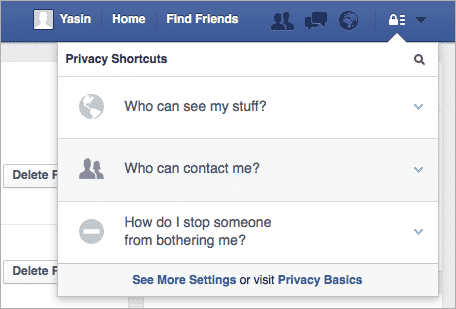
If you’ve given the labyrinth that is Facebook’s user settings a once-over before, you may already know that related settings are spread across several areas. For this reason, we’re going to look through each area in turn.
In “Privacy Settings and Tools,” Facebook provide you with options for controlling who can see your stuff, contact you and look you up.

If you’re under 18, you may be informed that “[Facebook] take extra steps to protect your information” – this means that the defaults for some settings may be already be configured for a higher level of privacy.
The first option, “Who can see my future posts?,” can be used to set a default audience for new status updates and content in the future. By audience, I’m talking about common groups such as “Friends of Friends” or “Public.”

However, it’s important to clarify that this does not work retrospectively. Posts from several months or years ago won’t be updated, but set this one to Friends to be on the safe side.
Review all your posts and things you’re tagged in is a special option – taking you to the Activity Log screen.

Here, you can peruse a past account of all the content you’ve been involved with. In some cases, you may have been tagged in a post – showing how your digital footprint isn’t always under your control!
We’ll come back to the Activity Log in the next section.
Limit The Audience for Old Posts on Your Timeline, also has a particularly sweeping effect. Clicking “Limit Old Posts” will change the audience of anything you’ve shared with Friends of Friends or the Public to Friends only.
“Include Public as an option in your audience selector?” is a one-time choice – enabling this option will add “Public” to your list of audiences. In my experience, once you’ve switched this on, it can’t be turned back off.
In terms of “who can send you friend requests”, choose Friends of Friends if you’re concerned about unknown invitations or solicitations. Otherwise, stick with Everyone.
The next two settings apply to people who can’t already view your email address and phone number, respectively. Ideally, set both of these “who can look you up” options to Friends to prevent data leakage.
The final – and rather important – option in this section, involves having your Facebook profile indexed by search engines. Unless your profile is well-known in the public eye, I’d ensure this setting is disabled.
Timeline and Tagging
We’re now going to take a look at settings specifically related to friends’ interactions with your Timeline, so click “Timeline and Tagging” in the sidebar.

This section involves the media and posts that other people link you to, rather than the content you create yourself.
Notice the first setting – “Who can add things to my timeline?” – this gives you the ability to control whether anyone else can post on your Timeline at all. Select Only Me if you wish to prevent Friends from posting on the feed.
The next option is “Who can see things on my timeline?”, which offers a link entitled “View As”.

This helpful feature lets you see what your Timeline looks like to the public or a particular friend. Upon clicking on View As, you’ll be presented with a Public view of the profile.
If you’re interested in seeing what a particular person views when they visit your profile, type their name into the selector.
It’s important to mention – Facebook advises you to “keep in mind that posts and photos you’ve hidden on your Timeline are still visible to the [people] they’re shared with [elsewhere], like in News Feed and search.”
Moving on, the next two options give you access to a more granular – or specific – range of audience selectors. “Who can see posts you’ve been tagged in on your timeline?” and “Who can see what others post on your timeline?” speak for themselves: these options let you control which groups can view mutual content.
If you’re concerned about strangers or acquaintances viewing these posts, consider opting for Friends except Acquaintances or Only Me for maximum privacy.

The next sub-section talks about “managing tags” and “tagging suggestions.” In clearer terms, we’re talking about the “Kate tagged you in an album” or “Michael tagged you in a post” notifications here.

I would recommend ensuring the Tag Review feature is set to enabled – which is where Activity Log returns to the spotlight.
Within the Activity Log is the home of Tag Review itself; here you’ll be presented with any content that friends have tagged you in. You’ll have the option to approve or reject these posts individually.

“When you’re tagged in a post, who do you want to add to the audience if they aren’t already in it?” is a rather cryptic, standalone option.
Imagine you’re tagged in an old school friend’s status update, but some of your friends don’t know them on Facebook. Setting this option to Friends, or another audience, allows you to share these posts with additional groups.
Finally, there’s tag suggestions. As a minor, this option is “Unavailable” to me – although I’d definitely recommend disabling it if you have the choice. If you leave this option enabled, Facebook will use your face and account in other people’s suggested tags.
Blocks, Apps and Ads
You may be in a situation where blocking a person is the most appropriate option. If you’re interested, look for the Blocking option on the sidebar.
As described, “once you block someone [completely,] that person can no longer see things you post on your timeline, tag you, invite you to events or groups, start a conversation with you, or add you as a friend.”
Instead of a “full block,” you can also choose to just block messages, app invites or event invites from particular friends.
Games and apps are hailed as a deeply integrated part of the Facebook Platform – but, to you and I, are unnecessary annoyances on the social network. You’ll see what I mean in just a second.
From the sidebar, visit the Apps section. These settings pose an unsettling risk to your privacy; the Platform itself involves Facebook “receiving information about your use of third party apps and websites.”
Look for the first heading, “Apps, Websites and Plugins”, and click Edit. I’d strongly advise clicking Disable Platform unless you’ve got a particular need for these features.

Next, look for the “Apps Others Use” heading and click Edit. This feature claims to make your Facebook experience “better and more social” – I’d recommend un-ticking every checkbox.

We’re about to wrap things up, but there are still a couple more settings to look through. The “Old Versions of Facebook for Mobile” option applies to older Facebook clients (e.g. on BlackBerry devices), which do not have the new audience selector feature.
Finally, let’s take a quick glance at the Ads section. Due to European behavioural advertising laws, this option may differ from country to country.

At the end of the day, you can improve your privacy by disabling or unchecking anything related to personalisation, interest or social actions.
Taking the above steps will help make your Facebook experience safer and more private, but don’t forget that history has shown that the social network has a habit of rolling-out changes to its privacy settings and introducing new features which may make you less protected online.
Make sure to keep informed of the latest changes, and review your privacy settings regularly.
If you are on Facebook, and want to be kept updated with news about security and privacy risks, and tips on how to protect yourself online, join the Graham Cluley Security News Facebook page.
If you’re thinking of leaving Facebook, why not listen to this “Smashing Security” podcast we recorded:
Show full transcript ▼
 This transcript was generated automatically, probably contains mistakes, and has not been manually verified.
My name is Graham Cluley.
We are going to discuss whether you should quit Facebook.
LastPass Enterprise simplifies password management for companies of every size with the right tools to secure your business with centralised control of employee passwords and applications.
But LastPass isn't just for enterprises. It's an equally great solution for business teams, families, and single users.
Go to smashingsecurity.com/lastpass to see why LastPass is the trusted enterprise password manager of over 33,000 businesses. Right, Facebook. Get me off it, kids.
Does it say anything in your feed that I've disappeared, or have I just kind of gone away?
You just disappeared into the mist.
If you remember, Graham, we did a lot of Facebook security training very early on in Facebook's birth and its growth.
And still my data could be compromised simply because I was friends with people that may not have been as privacy aware as me. Actually, it probably wouldn't have mattered.
Someone somewhere downloaded some game that hoovered up all my data.
You don't know what events are going on, you forget somebody's birthday, nobody wants to email you anymore, nobody answers the phone anymore.
Whereas for a lot of us who want to quit Facebook, it's like, well, we will literally have no way to keep in touch with people.
And they'll see a little, oh look, they said they like the picture of my child or whatever it was, or the holiday I'm on. That's nice. And you continue to feel connected.
What I don't like is that people, of course, give this curated image of themselves on social networks, you know, where they're, "Oh, aren't I fantastic?
Look at me, I'm doing my warrior pose at the yoga." That's like the max of your familiarity with yoga. I'm doing my sun salutation.
Because you could use Facebook to log into other apps, right?
I'm a Spotify user, and it's one of the many apps where you can create your account just by saying, just create your account with Facebook. You just click this button.
It's super easy. And I did that. And there's no way for me to easily disassociate my account without literally deleting my old account and creating a new one.
And then I'll lose my playlists and my albums. I have to recreate all that stuff I've done.
I don't have to generate passwords. Facebook's going to handle it.
And this site which I'm signing up for, I don't have to worry about them looking after my password because they're using the whole Facebook process instead.
So I think this is a really valuable thing for people to remember if they are considering quitting Facebook is what the impact will be on any other apps and websites which might be—
The way you can convince yourself that you've shared too much information on Facebook is to download a copy of your Facebook data, right?
There is a link, and we will put it in the show notes, which you can go to on Facebook. And regardless of whether you plan to quit or not, download your data.
It will download all the photos that you've posted and all the messages and all kinds of other stuff as well. You will be horrified.
And at that point, you begin to think, crikey, I volunteered so much information, information which I would never have given to a phishing site, information I would never have given to some scammer or fraudster ringing up on the phone.
I have willingly given to Mark Zuckerberg and his cronies, and what on earth are they planning to do?
I'm a little weird in how I use Facebook.
And I'm going to start off with the simplest thing you can do, which is not a complete cutoff, but it is called turning off the Facebook platform.
That is the thing which basically Facebook uses to integrate you with third-party apps and websites.
It's the thing which powers the like buttons which appear on third-party sites, which can of course track you around the internet, which isn't terribly nice either.
And this is the thing which was exploited by Cambridge Analytica's app, or the app which gave them the data, which allowed, for instance, your friends to give your information to other people as well.
So this is— if you're not ready to leave Facebook for whatever reason, you might want to consider turning off the Facebook platform.
So we're going to include a link where you can do that.
It's deep within the settings, and what it will mean is that all posts by apps and games and things like that will be removed from your timeline.
You won't be able to log into apps or games and websites using Facebook. Oh, wow, I live.
Oh, diddums. Oh dear, you've lost all that. But that is the most private I think you can really make Facebook without deleting the account altogether.
So there you are, disable Facebook platform.
Yippee, right? When you change your mind. So at the moment, you won't find Carole on Facebook. Carole could log back in if she wanted to, but right now, no one can see your profile.
No one can search for you.
And as soon as you log in, if you're using a password manager, it obviously just fills in the login page as you get there.
And bish bash bosh, you gotta do the whole deactivation again. So you can't get a friend to look to see if you've been removed.
Okay, so you don't clean up everything which you posted around the place. Your friends may even still see your name in their friends list, but it won't go any further beyond that.
But also keep in mind that if you deactivate your Facebook account, your Messenger account, which is like their IM system, that will remain active.
So disabling Facebook Messenger is a whole separate thing.
Now, I don't know if that's 100% true, but I know of some people who said they've sort of either deactivated or deleted their account, maybe just deactivated.
Have you heard about the Firefox extension that puts Facebook in its own little container tab?
They won't know that you're logged into Facebook as well.
Now I don't use—I use Firefox regularly, but one of the things that I've done is I've updated my ad blocker with specific code and rules which block any like buttons from working on pages when I visit them, because I don't want Facebook knowing which pages that I'm going to and gathering data about my movements around the internet if I do accidentally leave myself logged into Facebook.
And that's something else which you can do with a blocker as well. But this is all kind of really nitty-gritty advice.
I think maybe the push for this podcast is how are you going to stop giving any data to Zuckerberg?
So right after this sponsor break, we're going to talk about how you can actually delete your Facebook account entirely.
It's equally a great solution for business teams, families, and single users. Learn more at smashingsecurity.com/lastpass. LastPass.
Pretty hidden away, to be honest. You have to go hunting for it if you do want to do it.
And you will get this big fat warning says if you don't think you're going to use Facebook again and would really like your account deleted. We can take care of this for you.
Bear in mind, you will not be able to reactivate your account. So really, they want you to deactivate rather than delete your account.
I really wish I could.
Does nothing for a few days because it's given you a chance to change your mind.
Because that evening you're thinking, I wonder if anyone's posted any funny cat memes.
Your request is cancelled, yippee, and your account is back. And Facebook says it can take up to 90 days, up to 3 months to delete data they may have stored in their backup systems.
But it says during that time, your information isn't available on Facebook publicly.
If you've been communicating, if you've been sending messages to friends and things, they're still going to have those messages in their inboxes.
And the thing is, whatever privacy steps you take, even if shutting down platform and things like that, if you continue to have a Facebook account, you're still sharing information with Facebook.
And you have to ask yourself, do you trust this organization with your information?
You'll probably go on to some other social network instead.
Right. And so I started creating the community. Now I closed down my blog page. I told them I'm not going to update it anymore and it's going to be deleted.
Carole, what we haven't discussed is what should we do about the Smashing Security Facebook group?
Handwritten letter.
Right now, the one thing that is stopping me from deleting my personal account is that it is the administrator for our Smashing Security Facebook group.
I am gonna hold up a little flame for all our Facebook fans.
I'm sure we're not the only reason they're on Facebook, but why should we make it— I'm pretty damn sure that's not the case.
Why should we add to the difficulty of quitting the addiction?
We're going to check that we don't have any websites or third-party apps which are associated with our Facebook login.
And if they are, we'll recreate accounts on those sites without using Facebook logins. Okay. Or we just ditch the apps because what are they thinking?
And we'll zap the Smashing Security Facebook group. Sorry guys. Thank you for all the support. Go and join us on Twitter.
That helped me a lot.
I'm sure they've listened to the podcast and know, well, I'm going to give them time just to deal with it.
We'll be back next week with a regular episode, pick of the week and all the other goodies and a different guest.
But if you want to follow us in the meantime, you can join us on Twitter @SmashingSecurity. Security, no G, Twitter wouldn't let us have a G.
You can grab t-shirts and stickers and mugs and things like that at smashingsecurity.com/store.
And you can go to smashingsecurity.com for past episodes and for details on how to get in touch with us. Thanks for tuning in. Thank you, Maria, as well for joining us.
If you like the show, rate it on Apple Podcasts. It really does help new listeners discover us, which we like. Until next time, cheerio, bye.


Something has changed fairly recently on Facebook that means your privacy is not as secure as it used to be. If you "like" or comment on something, then all your friends see that post on their timeline. I am constantly seeing posts and photos from people I don't know, because one of my friends has interracted with it. Not only is it a breach of the privacy of the person who made the post – what is the point of marking it for friends only when it will be spread by the friends' comments? – but it also means my timeline gets cluttered with stuff that is of no interest to me.
I agree, you summed it up perfectly. I don't want others to know whether I like (agree with ) a range of subjects and I am not interested in my friends or friends of friends opinion either. It is a breech of privacy for all concerned.
This was the last straw that caused me to activate my account a week ago. I will leave my account deactivated for about a month before I decide on whether to delete it completely or reactivate. Facebook has become increasing irrelevant to me as well as being a bandwidth hog when using expensive mobile broadband.
'That's all well and good, but are you really aware of who's viewing your posts?'
I bloody well better be since I am one of those who is supposedly more disconnected but actually more connected because I don't use Facebook.
That out of the way. Now I see what people mean with their privacy issues being complicated. I'm thankful I don't have to read that entire wall of text for something that shouldn't be nearly as complicated as it apparently is. Not that it would take long to read but it's a lot more to read than should be needed.
Of course, there is a final two-part step that everyone could take (but few would take especially for privacy alone): tighten everything up (for the final state just in case – as I suspect – they don't clean up completely after account deletion) and then delete your account. I don't see that happens and so this document is the next best alternative.
Sharing this howto would be far better than much of the other rubbish being shared on Facebook. I suppose this is being linked/shared/whatever on the GC Facebook feed (or whatever it is called) ? I certainly hope so.